# SSO Privacy Guard Extension
To effectively defend against all SSO privacy leaks, we introduce SSO Privacy Guard.
This Chrome browser extension intercepts all SSO messages and applies both IdP-specific and generic rules on each request to detect SSO AuthRequests.
Our approach aims to block these requests by using a strategy that is orthogonal to the Google One Tap SDK.
## Demo
- Open Chrome or Firefox browser
- Log in to your Google account
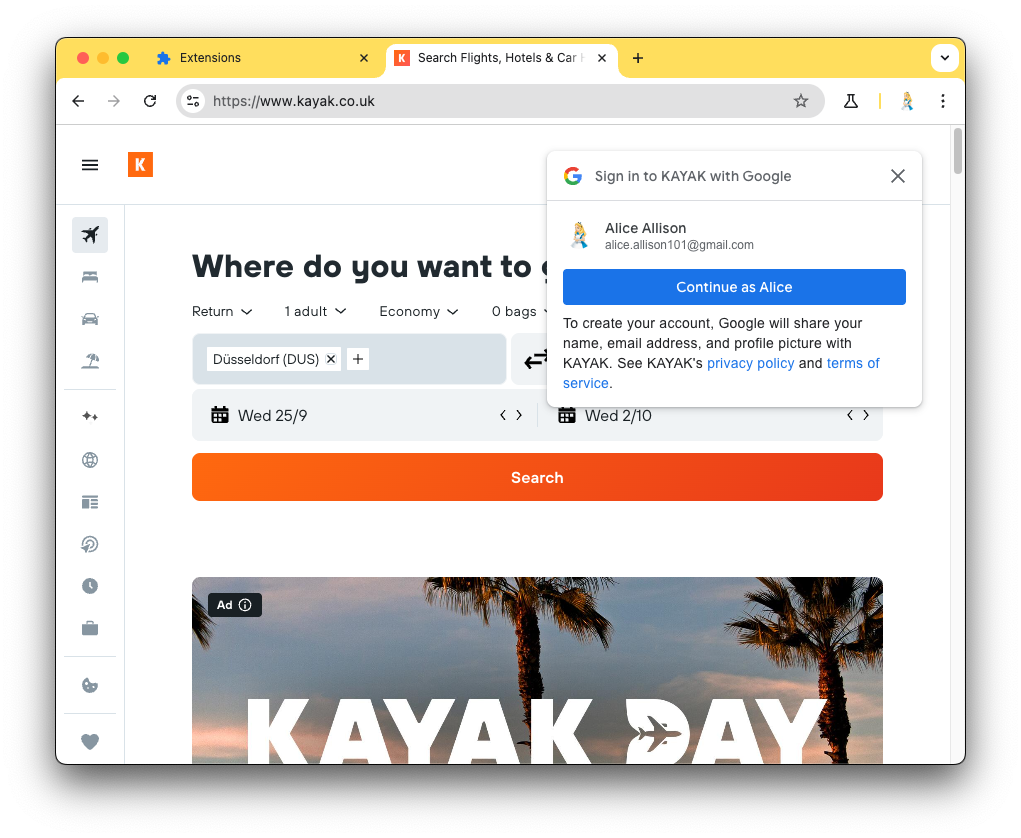
- Go to `https://www.kayak.co.uk/` and see the Google One Tap prompt, which automatically appears (privacy leak just happened):
-  - Install the SSO Privacy Guard extension (see [installation instructions](#Installation))
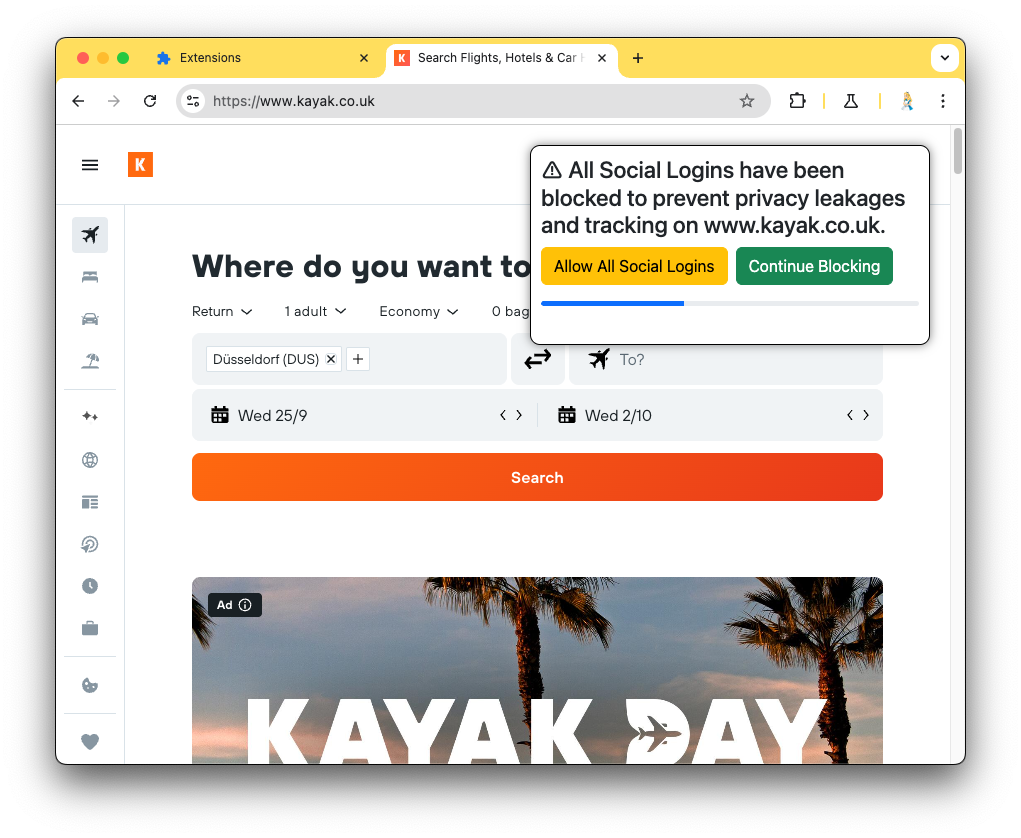
- Go to `https://www.kayak.co.uk/` and see the SSO Privacy Guard prompt, which automatically blocks the privacy leaks:
-
- Install the SSO Privacy Guard extension (see [installation instructions](#Installation))
- Go to `https://www.kayak.co.uk/` and see the SSO Privacy Guard prompt, which automatically blocks the privacy leaks:
-  ## Installation
In Chrome:
- Go to `chrome://extensions/` and turn on the developer mode (switch in top right corner)
- Click on `Load unpacked` button and select this folder that contains the `manifest.json` file
In Firefox:
- Go to `about:debugging#/runtime/this-firefox`
- Click on `Load Temporary Add-on ...` and select the `manifest.json` file in this directory
## The Google One Tap Experience
## Installation
In Chrome:
- Go to `chrome://extensions/` and turn on the developer mode (switch in top right corner)
- Click on `Load unpacked` button and select this folder that contains the `manifest.json` file
In Firefox:
- Go to `about:debugging#/runtime/this-firefox`
- Click on `Load Temporary Add-on ...` and select the `manifest.json` file in this directory
## The Google One Tap Experience
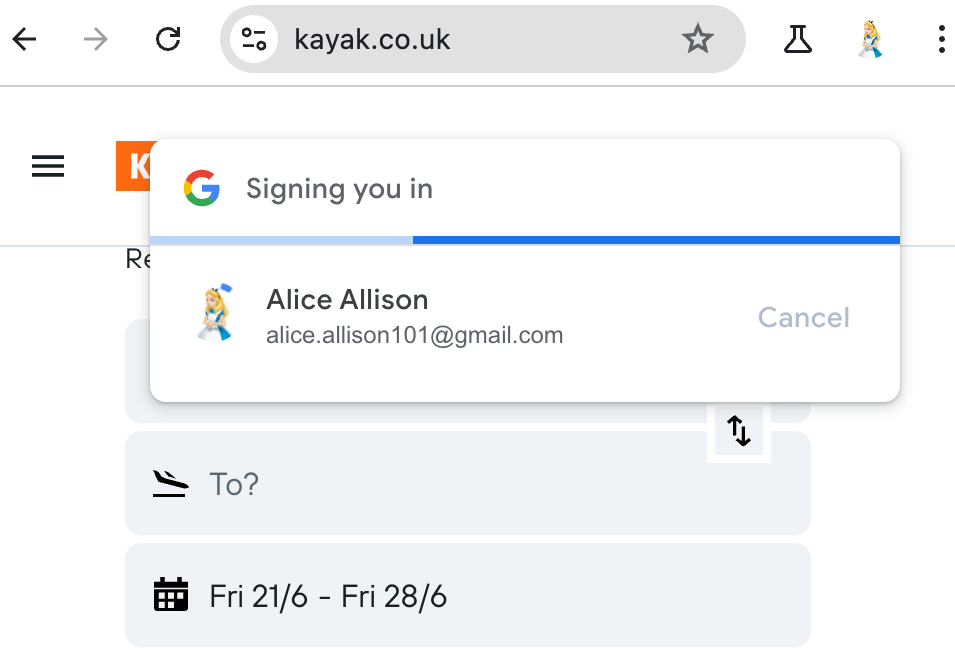 The Google One Tap SDK streamlines the sign-in process.
When a user visits a website using this SDK, a prompt appears in the top-right corner:
This prompt notifies the user of the automatic sign-in and initiates a three-second countdown.
If the user does not click the “cancel” button during this period, the SDK completes the sign-in automatically.
Should the user log out, the websites may reactivate the SDK, triggering the automatic sign-in once more.
This feature can occasionally result in a deadlock situation, preventing the user from logging out.
## Reversing the Google One Tap Experience
The Google One Tap SDK streamlines the sign-in process.
When a user visits a website using this SDK, a prompt appears in the top-right corner:
This prompt notifies the user of the automatic sign-in and initiates a three-second countdown.
If the user does not click the “cancel” button during this period, the SDK completes the sign-in automatically.
Should the user log out, the websites may reactivate the SDK, triggering the automatic sign-in once more.
This feature can occasionally result in a deadlock situation, preventing the user from logging out.
## Reversing the Google One Tap Experience
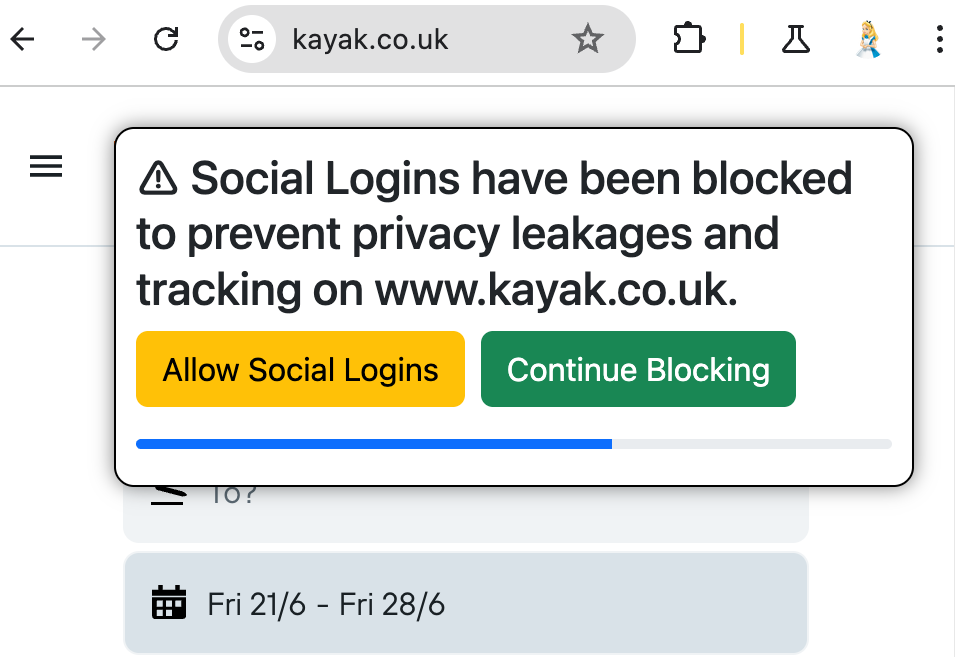 SSO Privacy Guard reverses this experience.
Rather than automatically signing in the user, which leads to PLs and FLs, SSO Privacy Guard proactively detects and blocks all SSO requests by default.
When SSO Privacy Guard blocks an SSO request, it displays a prompt inspired by the Google One Tap UI:
Within a ten-second window, users are presented with three choices:
First, by clicking the “Allow Social Logins” button, they can unblock the request and enable the SSO.
Second, they can choose to click the “Continue Blocking” button to keep the prompt dismissed while still blocking the requests.
Third, ignoring the prompt will automatically continue to block the request, which then vanishes after ten seconds.
## Memorizing the User’s Choice
The extension records the user’s choice to either allow or block SSO requests on a per-site basis.
This feature enables users to permit SSO on certain websites while blocking them on others.
Importantly, the prompt appears only once per website.
If a user decides to block SSO – either by clicking the button or letting the timeout expire – the decision is saved, and future SSO requests are automatically blocked without repeated prompts.
The same applies if a user chooses to allow SSO.
While the prompt is shown just once, users can modify their preferences for each website later in the extension settings.
## User-Initiated SSO
SSO Privacy Guard blocks all SSO requests that occur without user awareness, such as those embedded in invisible iframes.
However, it allows all user-initiated SSO requests to proceed.
This design ensures that the extension does not block SSO requests when users have consciously chosen to engage in the SSO login flow by clicking the SSO button.
We analyze information from HTTP request headers and data enriched by the Chrome extension APIs to determine if a request results from explicit user interaction or occurs without the user’s knowledge.
## Proof of Effectiveness
To demonstrate the effectiveness of SSO Privacy Guard, we tested it against all websites having at least one SSO privacy leak.
In all cases, SSO Privacy Guard was triggered and effectively prevented the privacy leaks.
SSO Privacy Guard reverses this experience.
Rather than automatically signing in the user, which leads to PLs and FLs, SSO Privacy Guard proactively detects and blocks all SSO requests by default.
When SSO Privacy Guard blocks an SSO request, it displays a prompt inspired by the Google One Tap UI:
Within a ten-second window, users are presented with three choices:
First, by clicking the “Allow Social Logins” button, they can unblock the request and enable the SSO.
Second, they can choose to click the “Continue Blocking” button to keep the prompt dismissed while still blocking the requests.
Third, ignoring the prompt will automatically continue to block the request, which then vanishes after ten seconds.
## Memorizing the User’s Choice
The extension records the user’s choice to either allow or block SSO requests on a per-site basis.
This feature enables users to permit SSO on certain websites while blocking them on others.
Importantly, the prompt appears only once per website.
If a user decides to block SSO – either by clicking the button or letting the timeout expire – the decision is saved, and future SSO requests are automatically blocked without repeated prompts.
The same applies if a user chooses to allow SSO.
While the prompt is shown just once, users can modify their preferences for each website later in the extension settings.
## User-Initiated SSO
SSO Privacy Guard blocks all SSO requests that occur without user awareness, such as those embedded in invisible iframes.
However, it allows all user-initiated SSO requests to proceed.
This design ensures that the extension does not block SSO requests when users have consciously chosen to engage in the SSO login flow by clicking the SSO button.
We analyze information from HTTP request headers and data enriched by the Chrome extension APIs to determine if a request results from explicit user interaction or occurs without the user’s knowledge.
## Proof of Effectiveness
To demonstrate the effectiveness of SSO Privacy Guard, we tested it against all websites having at least one SSO privacy leak.
In all cases, SSO Privacy Guard was triggered and effectively prevented the privacy leaks.